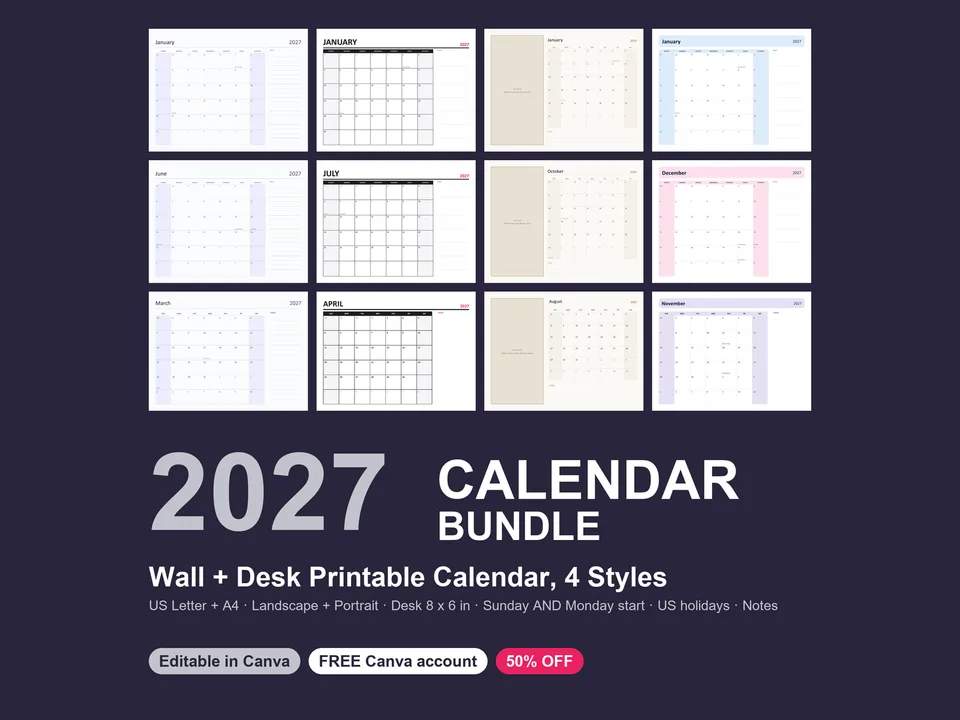
- 4 styles — Minimal (airy, hairlines, notes column), Bold Type (giant month name, black grid), Photo (a photo placeholder on every month and the cover: delete the box, drop in your photo), Soft Blocks (a soft color block that changes every month)
- Wall calendar, US Letter 8.5 x 11 in — landscape and portrait, 4 styles x Sunday/Monday start = 16 files
- Wall calendar, A4 210 x 297 mm — landscape and portrait, 4 styles x Sunday/Monday start = 16 files
- Desk calendar, 8 x 6 in landscape — 4 styles x Sunday/Monday start = 8 files (print on card stock, fold, clip or frame)
- Every file has 14 pages: a cover, a 2027 year-at-a-glance page (12 mini calendars) and January to December
- Big day cells with the date in the corner, weekends shaded, holidays in small text you can delete or replace, a notes area on every month
What You Get
- The .pptx template file(s)
- "How to open in Canva" guide (PDF)
- License file
How It Works
Upload the .pptx to a free Canva account. Canva turns it into an editable design in seconds. No Canva Pro needed. It also opens in PowerPoint and Keynote.
License
Personal and commercial use: use it for your own brand or for client work, and publish the finished designs anywhere. You may not resell or share the template files themselves.
All text, names and numbers inside are sample placeholders. Font: Inter (free).
Need help?
Email hello@brandingupstudio.com — we usually reply within 72 hours.