What it does
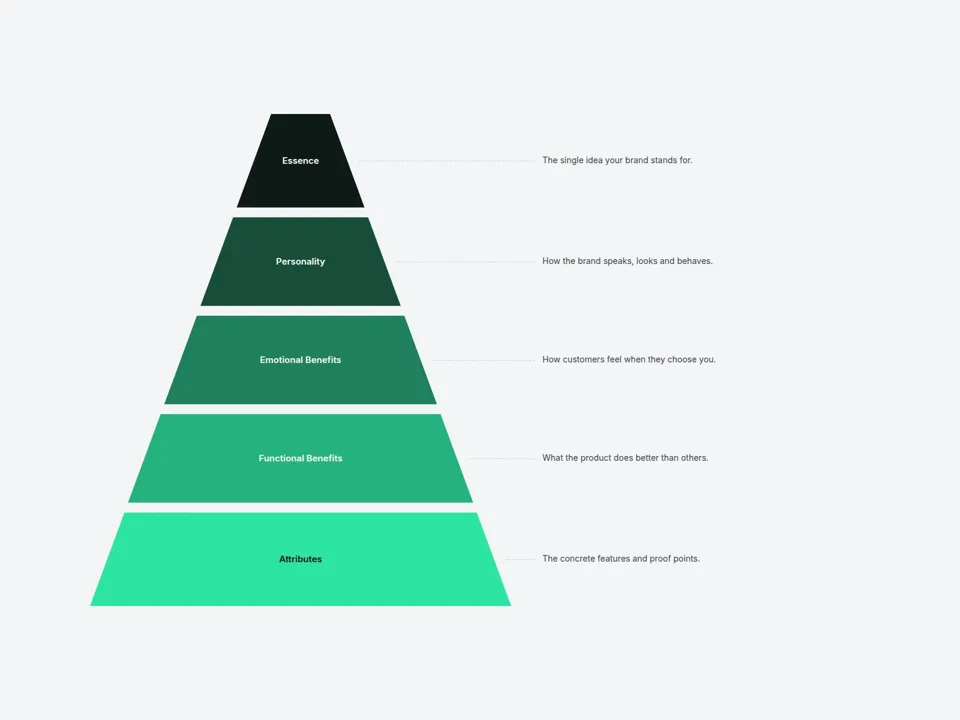
Type your levels from top to bottom and Pyramid Diagram draws the layers for you — evenly split, with a note beside each level connected by a dotted line. Pick two colors and every layer gets its own shade, with text color adjusting automatically for contrast.
Great for brand pyramids, marketing funnels, Maslow-style hierarchies, pricing tiers and learning paths.
Customizable properties
- Layers — label, note and (optional) custom color for each level
- Shape — Pyramid or Funnel, with a Pointed or Flat tip
- Colors — Gradient (Top → Bottom, auto-blended) or Custom per layer
- Gap — spacing between layers
- Side Notes — show or hide, adjustable notes width
- Compact Below — on narrow screens, notes move into a caption under the pyramid (tap a layer to read it)
- Hover Highlight — focus one layer and its note
- Entrance — layers stack in once when scrolled into view
- Style — note, line and light/dark text colors
- Fonts — layer and note fonts
Why this component
- No drawing: change the list, the shapes follow.
- Readable on every layer: text flips between light and dark based on the layer color.
- Mobile-ready: switches to a compact layout with a tap-to-read caption.
Need help?
Email hello@brandingupstudio.com — we usually reply within 72 hours. Custom edits are available from $75/hr.