What it does
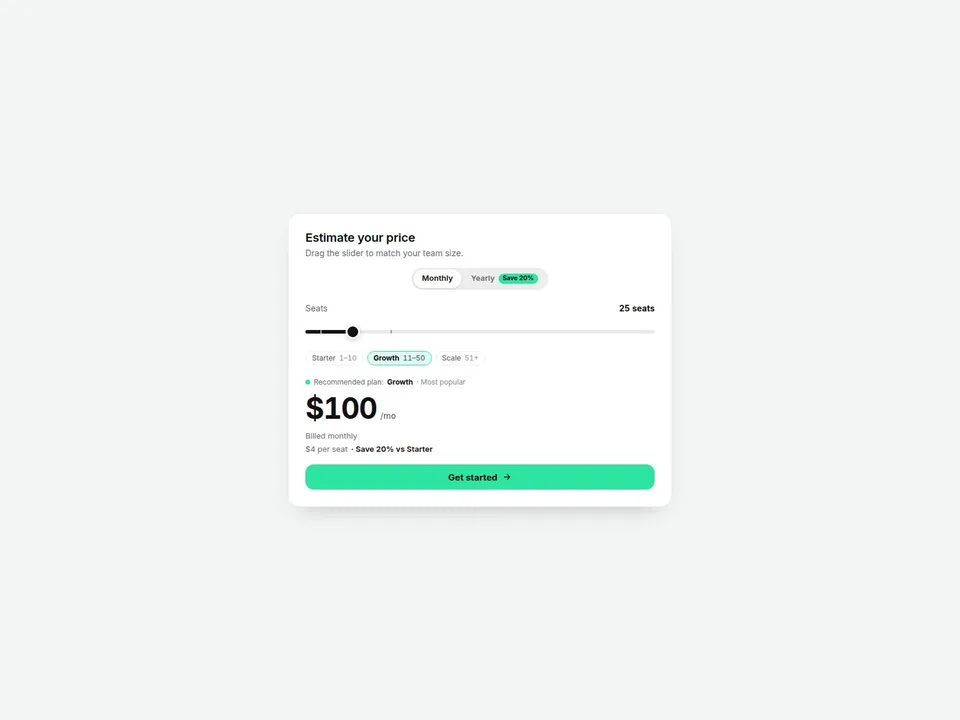
A pricing calculator for SaaS and app pricing pages. Visitors drag a slider (seats, users, credits — any unit you name) and the price rolls to the new amount instantly. Set tier breakpoints and the price per unit drops as usage grows; the matching plan is highlighted automatically, with the per-unit rate and the savings versus your list price shown right under the total.
Flip the monthly / yearly toggle to apply a discount with a "Save X%" badge and a "Billed … per year" line. Turn on "Custom at Max" and the top of the slider becomes "Custom" with a "Contact sales" button that links wherever you want — the enterprise pattern, built in.
Customizable properties
- Layout — Card (boxed) or Compact (inline, slider left / price right)
- Slider — unit label (plural & singular), min, max, step, default value
- Tiers — plan name, "up to" breakpoint, per-unit or flat pricing, price, short note; plus an optional base price added to every total
- Tier ladder & marks — plan pills with ranges (1–10, 11–50, 51+) and tick marks on the track; show or hide
- Per-unit price & savings line — show or hide
- Custom at Max — label, CTA text and link for enterprise requests
- Billing toggle — on/off, yearly discount %, default period
- Currency — symbol, position (before/after), space, decimals, thousands separator (comma, dot, space, none), decimal separator (dot or comma) — e.g. "1.234,50 €"
- Rolling numbers — on/off and duration
- CTA — text, link, open in new tab
- Labels — every text string (Monthly, Yearly, Save badge, Billed lines, Recommended, per-unit, savings)
- Style — card, text, sub text, track, fill, thumb, accent, border colors, radius, shadow
- Fonts — title, price and body fonts
Why this component
- Tier breakpoints, not just a flat rate: the per-unit price changes by tier and visitors see it — the plan pill switches as they drag.
- Enterprise-ready: hit the max and the card switches to "Custom / Contact sales" automatically.
- Real number formatting: symbol position, decimals and separators for US, EU and other formats.
- Accessible by default: native slider (keyboard arrows, Home/End, touch-friendly 24px thumb), screen readers hear "25 seats, $100 per month", and the rolling digits respect reduced-motion settings.
- Lightweight: no external libraries, no looping animations.
Need help?
Email hello@brandingupstudio.com — we usually reply within 72 hours. Custom edits are available from $75/hr.