What it does
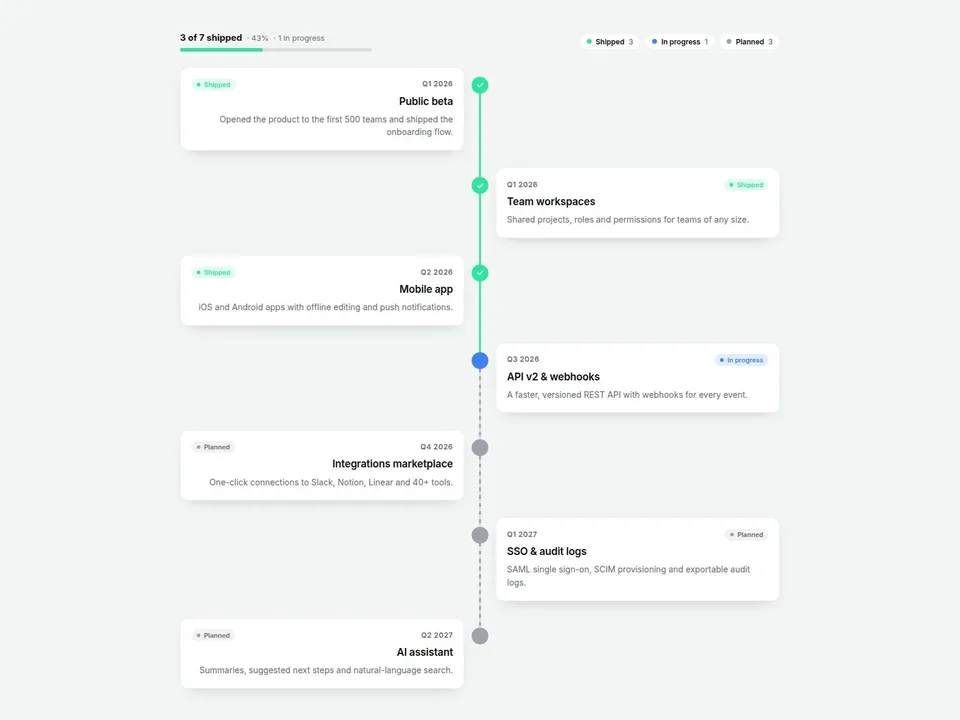
Scroll Roadmap turns a list of milestones into a timeline that draws itself as visitors scroll. Add a date, title, description and status for each milestone, and the component does the rest: the connecting line fills in step with the page, cards pop in as the line reaches them, and the line itself tells the story — solid up to the last shipped or in-progress milestone, dashed for everything still planned.
A compact summary ("3 of 7 shipped · 43%") and a clickable status legend sit on top, so visitors can see progress at a glance or focus on just the Planned items.
Built for SaaS and startup product roadmaps, company history pages, process steps and "how it works" sections.
Customizable properties
- Milestones — date, title, description, status (Done / In Progress / Planned), optional emoji icon and image for each
- Orientation — vertical or horizontal (horizontal scrolls sideways inside the component)
- Alignment — alternate left/right, or one side only (alternate collapses to one side on narrow screens automatically)
- Animation — On Scroll (line follows the page) or On Enter (draws once when it comes into view)
- Node Style — dot with check marks, ring, or numbered
- Summary & Legend — show or hide the progress bar and the status filter chips
- Line Width, Node Size, Spacing, Column Width (horizontal)
- Card — fill, border, radius, shadow on/off
- Colors — line track, line fill, text, sub text
- Status — label and color for Done, In Progress and Planned
- Fonts — separate title, date and body fonts
Why this component
- The line is status-aware: solid where you've delivered, dashed where you're heading. No other timeline shows progress in the line itself.
- Progress summary and status filter are built in — no extra components, no code.
- Plays nicely with Framer: no animation libraries, final state on the canvas, respects reduced-motion, pauses off-screen.
Where it fits
- SaaS and startup sites: a public product roadmap with real status
- About pages: company history that unfolds as visitors scroll
- Service and agency sites: a step-by-step process with the current stage highlighted
- Launch and changelog pages: what shipped, what's in progress, what's next
FAQ
- Does it work on the published site? Yes. The scroll effect runs on the live site and in Preview; the canvas shows the finished state so you can design around it.
- Can I use my own status names? Yes — rename Done / In Progress / Planned and pick any colors in the Status group.
- What happens on phones? Alternate layouts switch to one side automatically. Horizontal roadmaps scroll sideways.
- Can visitors click milestones? The legend chips filter by status. Milestone cards are display-only.
- Can it read from the Framer CMS? Not yet. Milestones are entered in the property panel.
Need help?
Email hello@brandingupstudio.com — we usually reply within 72 hours. Custom edits are available from $75/hr.