What it does
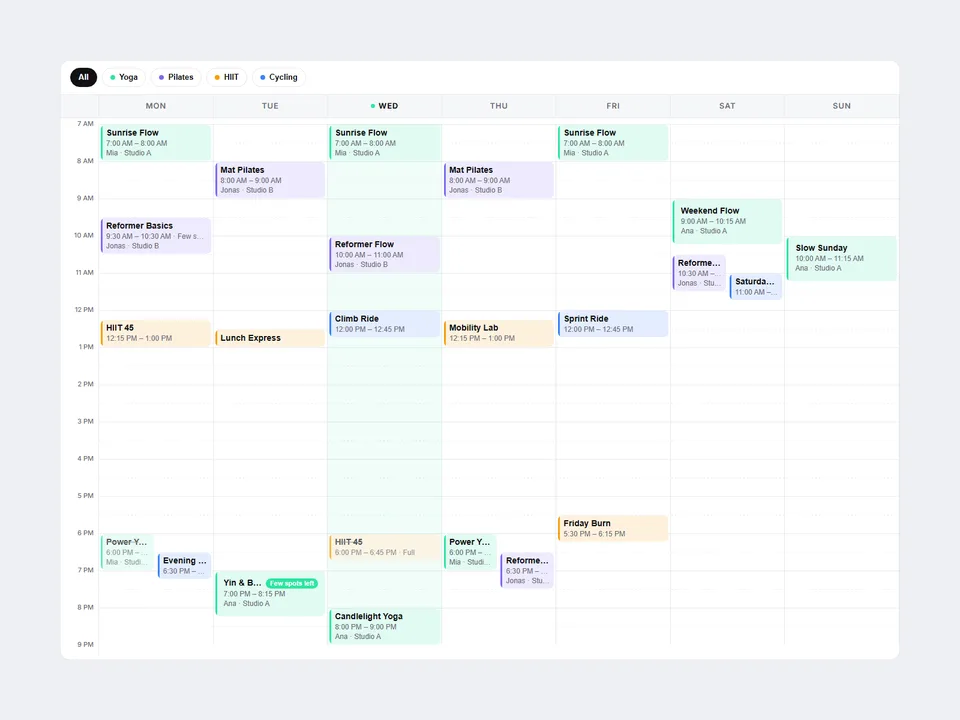
Type each session — title, day, start/end time, instructor, category, link — and Weekly Schedule Grid places it on a Mon–Sun time grid. Overlaps split side by side; the time axis spans your earliest to latest session (or a fixed range).
Visitors filter by category with built-in chips, see today's column highlighted, and click a session for a details popover with a Book button. Below 640px (adjustable) the grid becomes day tabs with a vertical list.
For studios, gyms, dance schools, academies, clinics, co-working spaces and conference agendas.
Customizable properties
- Sessions — title, day, start/end (HH:MM), instructor/room, category, description, link, status (Open / Few spots / Full), color
- Week Starts (Mon/Sun), Hide Empty Days, Time Format (12h/24h), Time Range (Auto/Fixed), Hour Height
- Filters + "All" label; Today — Auto, Off or a fixed day
- Details — popover with Book button, or direct link; Few Spots / Full labels
- Layout — Auto, Grid or List; Switch Below width; Day Labels
- Radius, Card Radius, 8 colors, two fonts
Why this component
- Times in, grid out. Change a time and the card moves.
- Overlaps handled automatically.
- Filter chips, status badges and per-session booking links built in.
- Accessible: real buttons, Escape closes the popover.
- No images, no CMS, no external libraries. Print-friendly.
Need help?
Email hello@brandingupstudio.com — we usually reply within 1 business day. Custom edits are available from $75/hr.